
X-ray vision for AI agent sessions. A zero-config HTTP proxy that records every API call between Claude Code, Codex, and their upstream APIs, with a real-time dashboard and workflow timeline to inspect what's actually happening inside your agent.


Claude Code is a black box. You can't see:
- What system prompts it sends (and how they change between versions)
- How much each tool call costs
- Why it's thinking for 30 seconds
- What context is eating your 200K token window
ccxray makes it a glass box.
npx ccxray claude
# or
npx ccxray codex
# or
npx ccxray grok
The proxy starts, the selected CLI launches through it, and the dashboard opens automatically. On macOS and Linux, agent launches without --port share one hub and dashboard. Windows runs each launch as its own standalone server; see the example below.
If ccxray cannot load the proxy or attach to a hub, it starts the agent directly and that session is not recorded. The hub attach budget is 3000 ms by default; an unresolved attach falls back when the budget expires, and an earlier failure can fall back sooner. Set CCXRAY_ATTACH_TIMEOUT_MS to change the budget. ccxray attempts to append a fallback record to <CCXRAY_HOME>/fail-open.log (default ~/.ccxray/fail-open.log), but writing that file is best effort. Set CCXRAY_FAIL_CLOSED=1 to stop instead of falling back. Claude --bg / --background launches bypass the proxy by design.
For a persistent install with Claude's shell wrapper (local recording only):
npm install -g ccxray
ccxray setup
# Open a new terminal (or reload your shell profile), then verify:
ccxray setup --check
Plain ccxray setup writes no export settings and needs no bucket, domains, or gcloud credentials. Summary export to GCS is opt-in with --export. Before using it, install Claude Code and make sure its logged-in account email is available to ccxray. The --domains list must include that account's domain. Export setup also requires readable gcloud Application Default Credentials; run gcloud auth application-default login first. Setup rejects CCXRAY_EXPORT_GCS_KEY_FILE, even though the exporter itself supports a service-account key file.
gcloud auth application-default login
ccxray setup --export --bucket "<bucket>" --domains example.com --cwd-allowlist "project-a,project-b" --retention-days 30
An install that already exports (set up by 2.x) keeps exporting when ccxray setup is re-run without --export: setup leaves its export block unchanged, does not read credentials or rewrite enrollment, and prints one line naming ccxray setup --export (refresh) and ccxray setup --remove (stop).
Transcript import is off by default on fresh installs and upgrades, in both hub and standalone mode. Set CCXRAY_IMPORT_DISABLE=0 before starting ccxray or Herdr to opt in to automatic transcript import (restart an existing hub to apply it). For a one-time import, run ccxray import --once. CCXRAY_IMPORT_DISABLE=1 blocks even explicit imports; unset it for a one-time import. Existing indexed history remains available.
setup adds a Claude wrapper to your shell profile (plus export settings with --export), sets log retention, and writes CCXRAY_IMPORT_DISABLE=1. It does not install a Codex wrapper. Preview changes with ccxray setup --dry-run (include the same setup options). ccxray setup --remove removes ccxray's shell block and writes a tombstone to stop future uploads; it does not delete local logs or uploaded summaries. See the export onboarding guide for the data and removal details.
Run ccxray sessions inside Herdr with live sidebar context, Mission Control, and capability review:
herdr plugin install lis186/ccxray/plugins/herdr
herdr plugin action invoke ccxray.herdr.quick-start
The second command opens a cursor-driven Quick Start because installing into an already-running Herdr process does not run startup hooks. Use the arrow keys or j/k and Enter; number and letter shortcuts remain available. The plugin also offers Quick Start once on the next full Herdr startup if onboarding is still incomplete. It detects installed providers and launches the first traced session; sidebar changes remain optional, explicit, and reversible. Mission Control appears after the first traced session, while the experimental Capability Footprint appears after enough samples exist. See the Herdr plugin guide for usage, trust, update, and uninstall details, and the Herdr support guide for the Provider matrix and known limitations.
The launcher argument is provider-backed. Today claude, codex, and grok are supported; unknown provider commands fail fast instead of silently starting an unconfigured proxy.
ccxray                           # Proxy + dashboard only
ccxray claude --continue         # Example provider arguments
ccxray codex exec "hello"        # Example provider arguments
ccxray grok -p "hello"           # Example provider arguments
ccxray --port 8080 claude        # Custom port (independent, no hub sharing)
ccxray claude --no-browser       # Skip auto-open browser
ccxray status                    # Show process, export, home, and hub status
ccxray --port 5602 status        # Probes port 5602 only when no hub lock is found
ANTHROPIC_BASE_URL=http://localhost:5577 claude   # Point existing claude session at a running ccxray hub
Hub vs standalone, keeping a proxy up, and pointing agents that are not launched through ccxray at it: see Running ccxray.
Provider arguments are forwarded to the CLI. ccxray consumes its recognized global flags, such as --port and --no-browser, wherever they appear in the argument list; they are not forwarded to the CLI.
On macOS and Linux, running ccxray claude in multiple terminals automatically shares a single proxy and dashboard — no configuration needed. Windows has no shared hub: each ccxray launch is standalone and needs its own port.
# Terminal 1
cd ~/project-a && ccxray claude     # Starts hub + claude

# Terminal 2
cd ~/project-b && ccxray claude     # Connects to existing hub

# Both projects visible in one dashboard at http://localhost:5577
If the hub process crashes on macOS or Linux, connected clients automatically recover within seconds. On Windows, start each launch on a distinct port:
# Terminal 1
ccxray --port 5577 claude

# Terminal 2
ccxray --port 5578 claude
Open http://localhost:5577 and http://localhost:5578 to view each standalone dashboard.
$ ccxray status
Hub: http://localhost:5577 (pid 12345, uptime 3600s, v<version>)
Process: exportState=enabled ... identity={...}
Home: ~/.ccxray — current — cursor has consumed through the index tail (...)
Machine: {"proxy":true,"hub":true,"pid":12345,"port":5577,"occupant":"ccxray-hub"}
Connected clients (2):
  [1] pid 23456 — ~/dev/project-a
  [2] pid 34567 — ~/dev/project-b
Shell: exportState=enabled hash=... — this shell's environment, not what the running exporter uses
Config: equal
Durable: ~/.ccxray (named by hub) — enrollment=enrolled · cursor ... · last attempt ...
The Process, Home, Shell, Config, and Durable lines report the running process, local export state, this shell's settings, and persisted enrollment/cursor history. Use --port to run an independent server instead.
Launchers are registered in server/providers.js (same hub + dashboard for all):
| Command | Wire family | Upstream (default) |
|---|---|---|
ccxray claude |
Anthropic Messages | api.anthropic.com |
ccxray codex |
OpenAI Responses | api.openai.com / ChatGPT |
ccxray grok |
OpenAI Responses (client module) | cli-chat-proxy.grok.com (XAI_BASE_URL override) |
OpenAI-wire clients that are not Codex (today: Grok) are listed in OPENAI_WIRE_CLIENTS — shared parser, distinct host/agent/raw-session bucket. Multi-agent hubs mix them without swapping OPENAI_BASE_URL. Acceptance notes: Grok testing.
Grok billing disclosure: When proxying Grok CLI traffic, ccxray calls cli-chat-proxy.grok.com/v1/billing (using the same auth token the CLI already sends through the proxy) to populate the Usage tab's account card. Repeat calls are suppressed for 60 seconds after a successful response (per alias+credential). Set XAI_BASE_URL to point the call at a different host.
npx ccxray codexAPI-key sessions are supported. Known unsupported in 2.5.0-rc.3: ChatGPT-login sessions with Codex 0.159.2 and 0.163.0 fail workspace-routing bootstrap through the local HTTP proxy (#671). Run Codex directly without the ccxray base-URL overrides for these sessions. See the investigation for the discovery-path mismatch and HTTPS-origin constraint.
For compatible ChatGPT clients, routing to chatgpt.com/backend-api/codex triggers on the chatgpt-account-id header. Codex's startup platform polls (plugin lists, connector directory, app metadata) are proxied but hidden from the dashboard so the timeline shows only conversation traffic.
Beta caveats:
- WebSocket transport (
/v1/responsesupgrades) is decoded per frame: each codex turn records model, token usage, request instructions/input/tools, and response events. A few large envelope events are stored as compact timing anchors (for TTFT) rather than full payloads, so codex turn detail can still trail Claude turns in places. - Limited real-world testing compared to the Claude path.
Env vars for tuning: OPENAI_BASE_URL, CHATGPT_BASE_URL, CCXRAY_WS_IDLE_TIMEOUT_MS, CCXRAY_WS_MAX_QUEUE_BYTES. Details in CLAUDE.md.
File issues on GitHub — Beta means we want the rough edges reported.
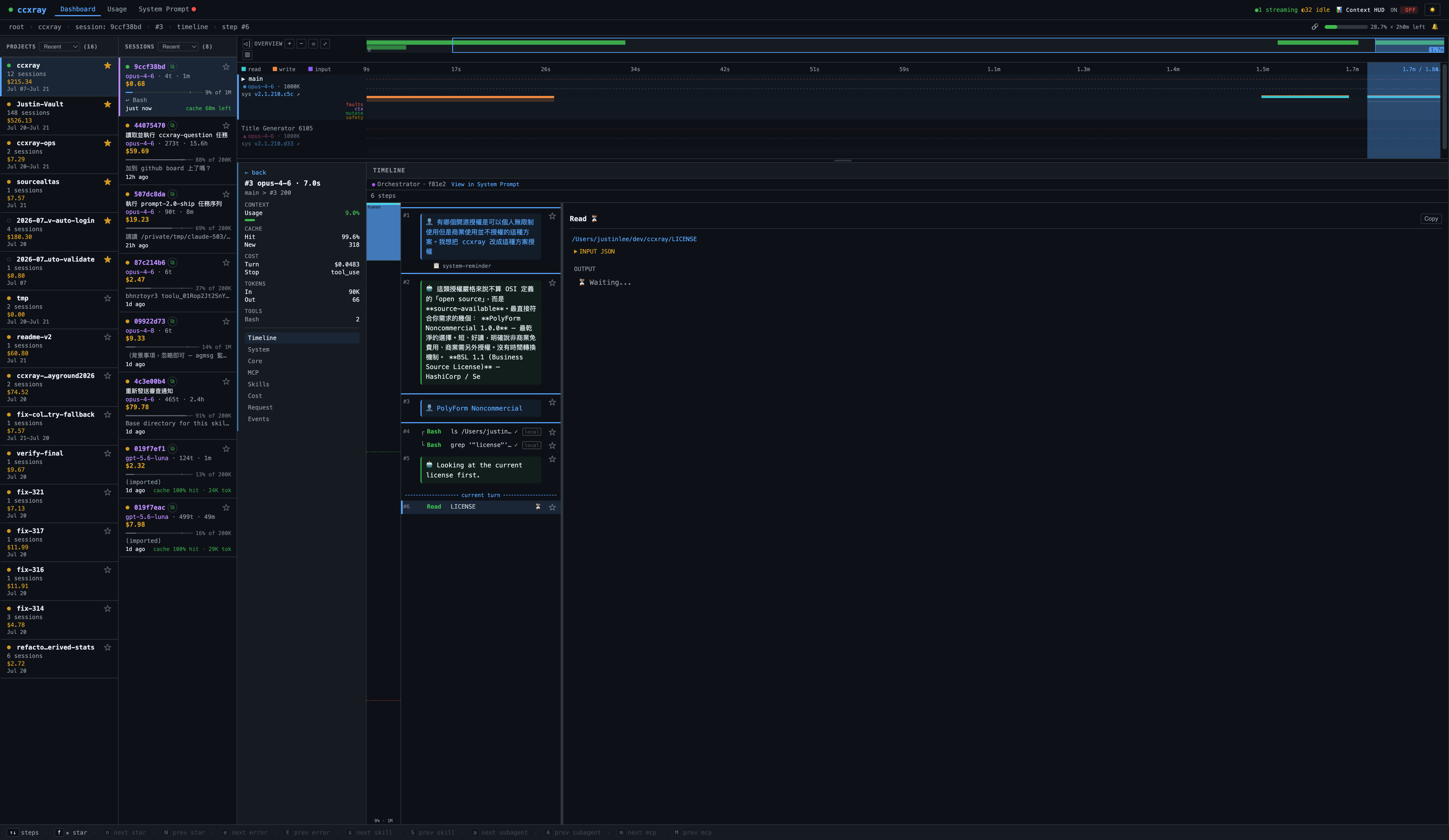
Watch your agent think in real-time and see its concurrency structure.
Turn cards: Every turn renders as a five-line card — cost, cache warmth (with inter-turn gap timing to catch cache misses), tool-fail risk, hit:0% red warnings, and tools surfaced above the title. Scan a whole session's health without expanding a single card.
Lane visualization: Multi-agent sessions automatically split into parallel lanes — orchestrator on the main lane, subagents on separate Fork / Teammate lanes. Each lane gets a distinct color from a WCAG ≥3:1 contrast pool, with mixed-model labels. The sequential-interleave tracker marks which turns within a conversation ran sequentially vs concurrently.
Birdseye mode: Toggle the birdseye overview to expand the overview strip to ~80% viewport, with a magnified minimap and range summary for navigating long sessions.
L1/L2 dual-state selection: Tab / ▲▼ selects lanes (L1), j/k selects turns within a lane (L2), Esc walks back level by level. Replaces the old single-level click model.
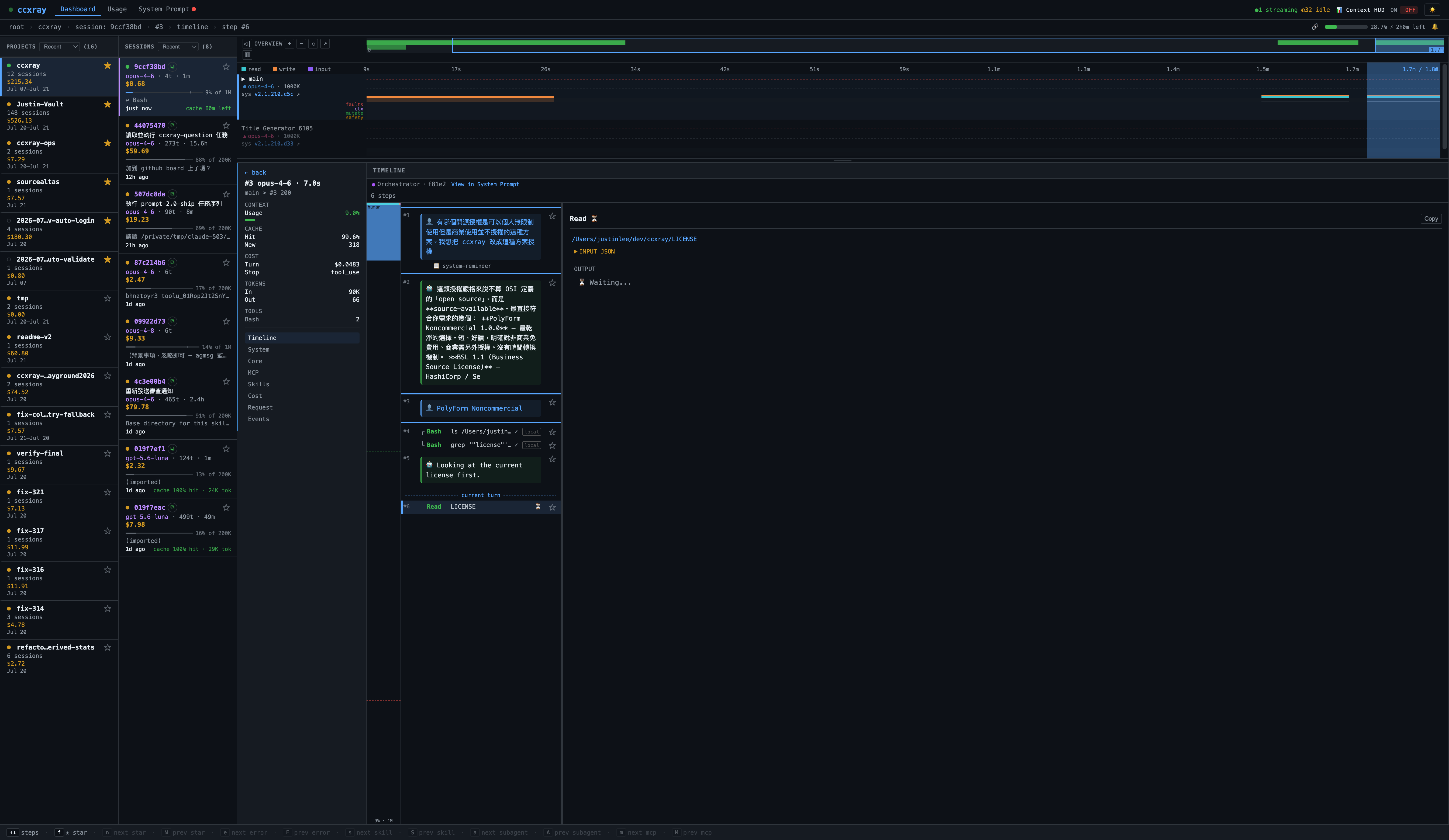
Track your real spending. Burn rate, per-account rate-limit cards for Claude and Codex — know exactly where your tokens go.
Automatic version detection with diff viewer. Browse prompts across multiple recognized agent types and see exactly what changed between updates. Uncertain prompts are honestly marked unknown.
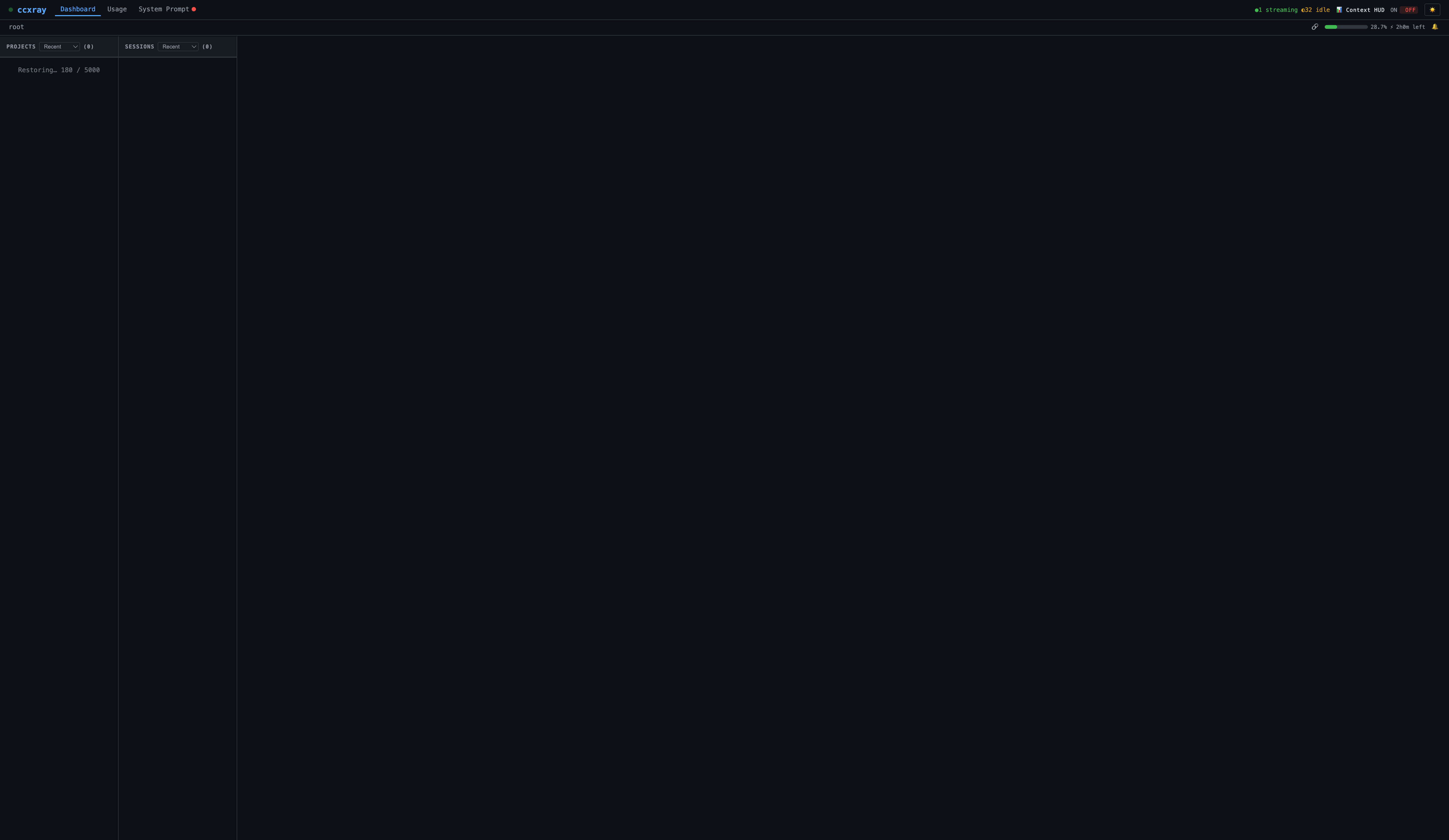
Drive the whole dashboard with your keyboard. Every screen shows a context-sensitive hint bar at the bottom — the currently valid shortcuts, live-updated as you move. Press ? for the full cheatsheet. Navigate projects → sessions → timeline → individual diff hunks without touching the mouse.
Workflow navigation: Tab / ▲▼ switches between lanes (L1 selection), j/k switches between turns within a lane (L2 selection), Esc walks back one level at a time.
Step-type jumps: e/E jumps to the next/previous error, s/S to Skill calls, a/A to subagent (Agent/Task) calls, m/M to MCP tool calls. Each jump is position-aware — it finds the nearest match forward or backward from wherever you are, and updates the address bar URL.
n/N jumps to the next/previous starred item anywhere in the dashboard — across projects, sessions, turns, and individual timeline steps. The command bar shows the shortcut only when starred items are reachable from the current view.
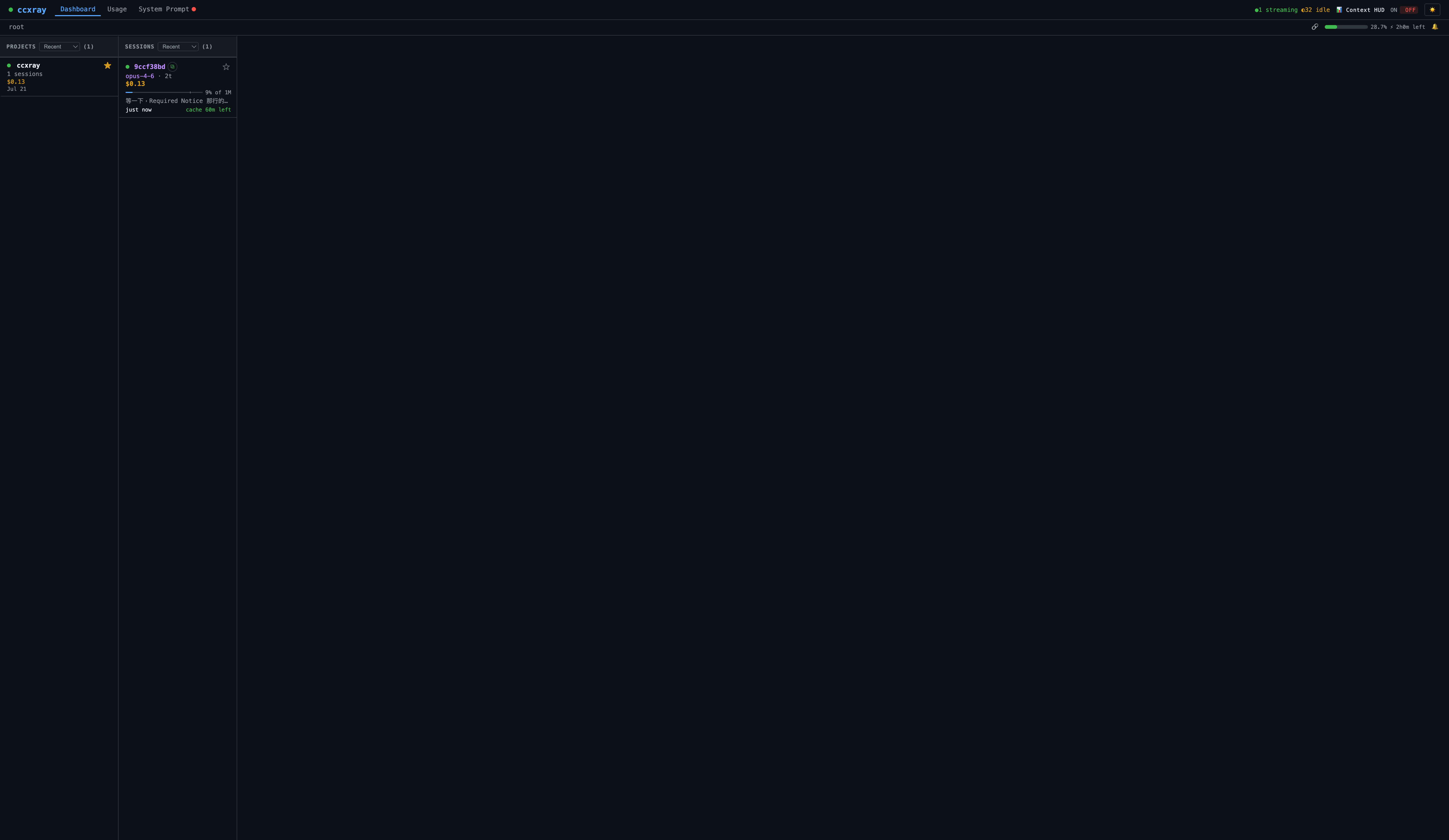
Session cards show Claude Code's generated titles (e.g. Fix login button on mobile) instead of raw hashes, with a live cache TTL countdown (cache 4m left) that pulses red under 1 minute. When any session nears expiry, the browser tab alternates between ccxray and ⚠ ccxray. Opt-in browser notification fires at a plan-aware lead time — 5 minutes for Max, 60 seconds for Pro/API key. Titles fall back to the short hash for direct-API traffic or sessions still in flight.
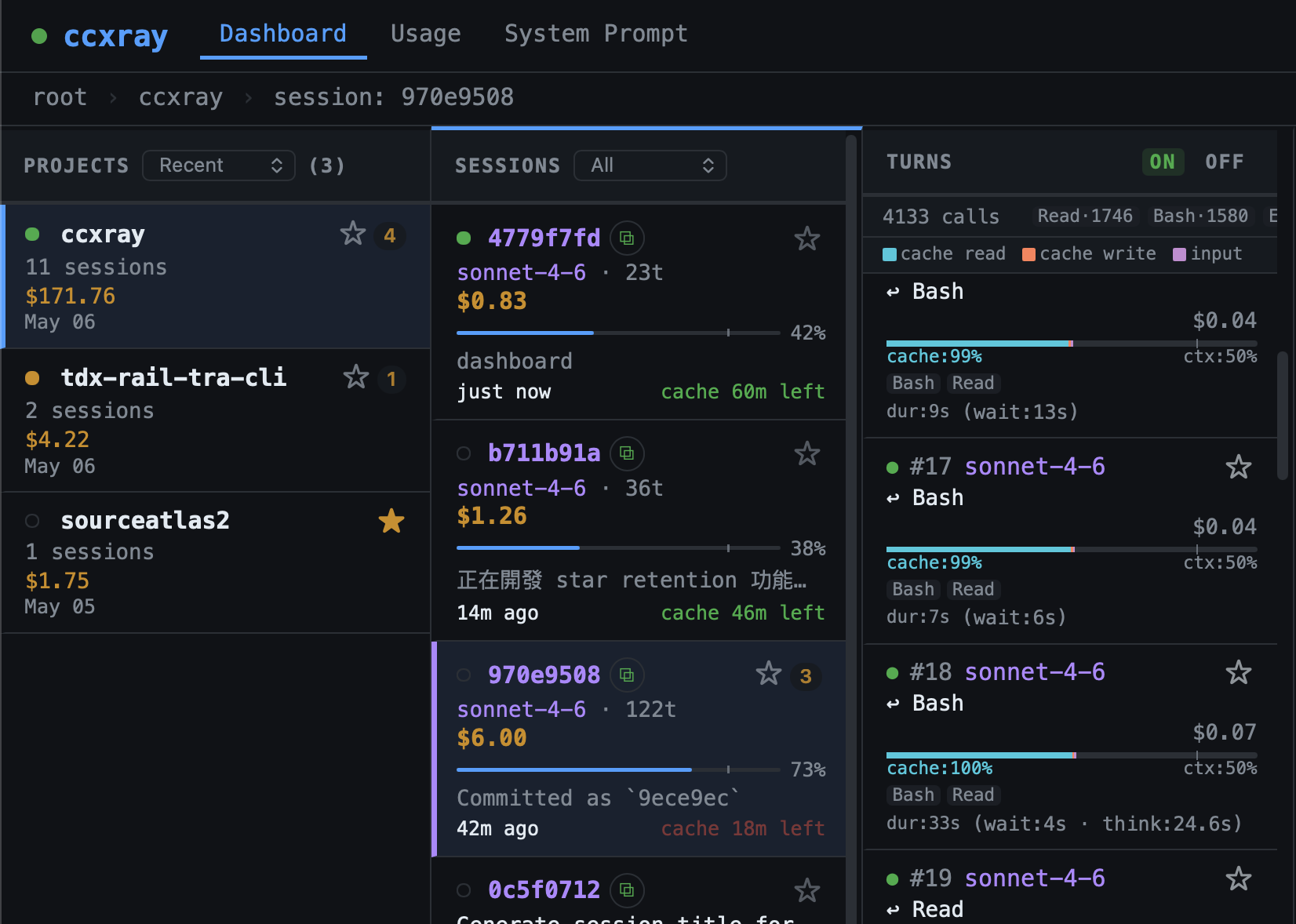
Each session card shows a weather emoji (☀️ sunny → ⛈️ stormy) based on context pressure, compaction, output truncation, latency drift, and cache hit rate. Missing tool-result evidence can also make the status unavailable. Hover for a breakdown. See the weather guide for signal definitions and scoring.
Note (2.3.1): Weather display is off by default while the tool-failure signals are being fixed. Computation continues in the background. Append
?weather=onto the dashboard URL to inspect, or setlocalStorage.setItem('ccxray-weather-display', 'on')to persist. See the weather guide for details.
ccxray auto-detects your subscription plan (Pro vs Max 5x vs Max 20x) by reading Anthropic's cache_creation usage fields — no configuration needed. Cache TTL and quota thresholds use the detected plan. Override with CCXRAY_PLAN if auto-detection gets it wrong.
See 5-hour and weekly quota usage for every Claude and Codex account on one dashboard. Cards auto-discover ~/.codex-*/sessions/ for multi-account Codex setups, and read Claude statusline data via ccxray setup-statusline. Business/unlimited Codex plans show ∞ Unlimited. Data refreshes in the background every 30 seconds without blocking the proxy.
Pause requests before they reach Anthropic. Toggle intercept on a session and the next request from Claude Code is held in the dashboard — edit the system prompt, messages, tools, or sampling parameters, then approve (forwards your edited copy) or reject (returns an error to Claude Code). Useful for prompt engineering, sandboxing risky tool calls, and running experiments without forking the agent.
Optional context-stats footer appended to Claude's responses inside Claude Code itself: 📊 Context: 28% (290k/1M) | 1k in + 800 out | Cache 99% hit | $0.15. Off by default (since 3.0.0); turn it on with ccxray hud on or from the dashboard topbar, check it with ccxray hud status, and turn it off with ccxray hud off.
Why a toggle? When the parent agent calls sub-agents (Agent / Task tool), the appended block can truncate the sub-agent's response before it's returned to the parent — causing silent data loss in multi-agent workflows. Keep the HUD off for sub-agent-heavy or automated sessions. State persists in ~/.ccxray/settings.json (shared by the CLI and the dashboard toggle); an explicit "statusLine": true there stays enabled after upgrading. A running hub or server picks up a CLI change when it restarts; the dashboard toggle applies immediately.
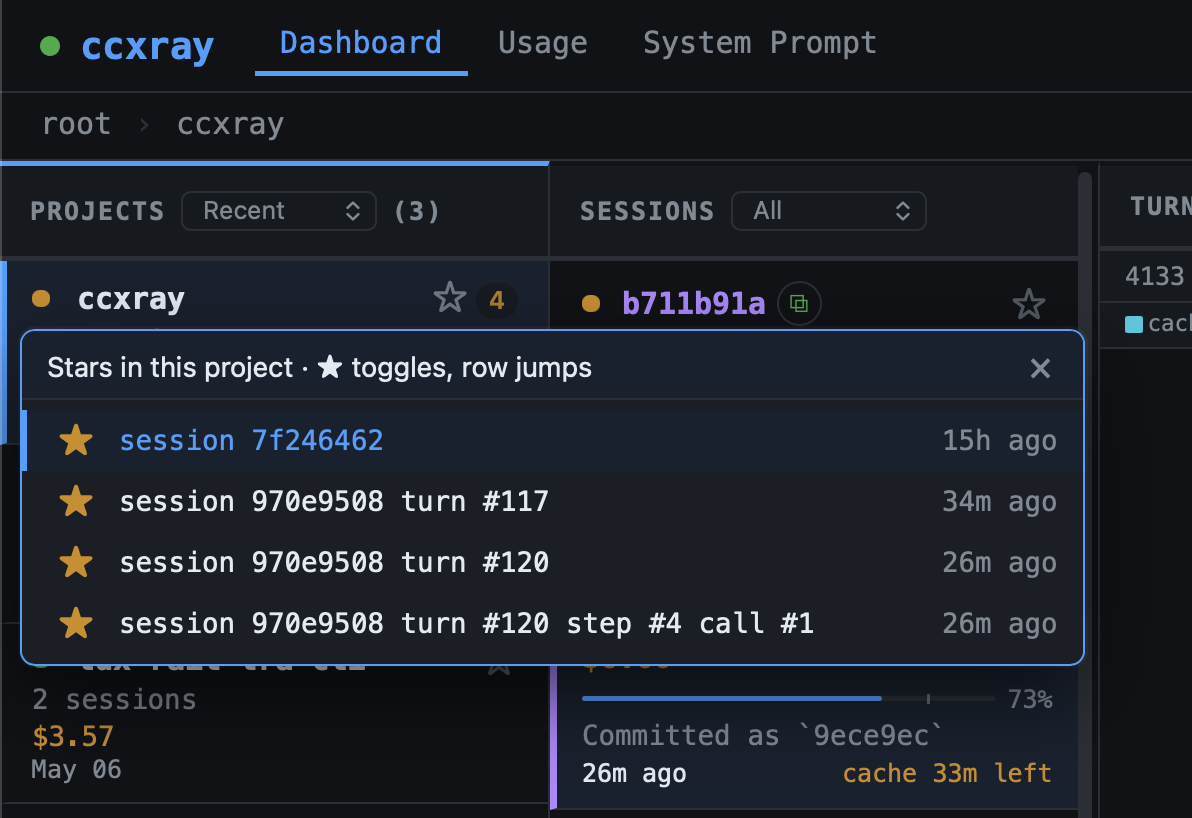
Click the star on a turn, session, or project card to mark it for permanent retention. Starred items survive LOG_RETENTION_DAYS auto-prune; state lives in ~/.ccxray/settings.json, server-side and persistent across browsers. A starred turn protects every turn in its session; a starred session protects every turn under it; a starred project protects everything beneath. Catch-all buckets (direct-api, (unknown), (quota-check)) refuse stars at the bucket level — star individual turns inside instead.
Individual timeline steps can also be starred (★/☆ toggle on each step row). A starred step protects its parent turn and session identically to a direct turn star.
When a parent inherits protection from a starred descendant, the badge becomes ☆ [N] instead of ★. Click the chip to open a popover listing exactly which descendants are keeping it retained. Each row's star is its own toggle; clicking the row body navigates straight to that turn / session.
ccxray usage                          # Human-readable summary
ccxray usage --json                   # JSON for agents (< 4KB)
ccxray usage --last 7d                # Last 7 days (supports d/h/m)
ccxray usage --cwd myproject          # Smart match by directory name substring
ccxray usage --cwd ~/code/app         # Absolute or ~ path → exact-subtree prefix match
ccxray usage --cwd proj-a,proj-b      # Multiple projects → comparison table
ccxray usage --session latest         # Most recent session
ccxray usage --session costliest      # Highest-cost session
ccxray usage --session "fix login"    # Search by session title
ccxray usage --session 950432         # UUID prefix match
ccxray usage --session costliest --open  # Jump to that session in the dashboard
ccxray usage --tools                  # Full tool breakdown
Automated usage analysis in 0.6 seconds — know where your tokens and dollars go without manual log diving. Reads index.ndjson directly, no server needed. Shows model cost breakdown, tool & skill usage, prompt hash stability (how often system/tools/core prompts change between turns), cache hit rates by inter-turn gap, and the 10 costliest sessions with titles.
The --json output is an agent-facing contract — see docs/usage.md for the full field-by-field schema, the multi-cwd and error shapes, and filter semantics.
ccxray agentflow report              # Every Ask of the project's agentflow notebook
ccxray agentflow report --ask A-012  # One Ask
ccxray agentflow report --json       # JSON
For projects that use agentflow: tokens, cost, models, effort and time for every Ask of the notebook, split by host session, subagents and dispatched external workers. The report reads transcripts for attribution, but usage figures come from turns in the ccxray index. If the needed turns are already indexed, import can be skipped; transcript-only history must be imported before it contributes usage. ccxray setup disables import, so use the guide's one-command import flow when needed. No server is required. See docs/agentflow-report.md.
- Deep Link Navigation — Every selection (project / session / turn / step) is reflected in the address bar URL. Paste a URL into a new tab and the dashboard navigates directly to the same view.
- Collapsible sidebar — The overview panel can be collapsed to give the timeline more room.
- Cache TTL split — Turn detail shows whether the cache used a 5-minute or 1-hour TTL.
- Hidden projects — Set
hiddenProjectsinsettings.jsonto hide specific projects from the dashboard; hidden projects don't leak when sharing. - Per-session restore cap —
CCXRAY_SESSION_ENTRY_CAPlimits entries loaded per session at startup, preventing a single giant session from crowding out others. - Session Detection — Automatically groups turns by Claude Code session, with project/cwd extraction
- Token Accounting — Per-turn breakdown: input/output/cache-read/cache-create tokens, cost in USD, context window usage bar
Claude Code  ──►  ccxray (:5577)  ──►  api.anthropic.com (or ANTHROPIC_BASE_URL)
                      │
                      ▼
              ~/.ccxray/logs/ (JSON)
                      │
                      ▼
                  Dashboard (same port)
ccxray is a transparent HTTP proxy. It forwards requests to the upstream API (Anthropic or OpenAI), records both request and response as JSON files, and serves a web dashboard on the same port. Loopback requests to the dashboard and upstream APIs are trusted by default. Set CCXRAY_LOOPBACK_REQUIRE_AUTH=1 to require authentication on loopback. Protected non-loopback dashboard/API requests require valid authentication; upstream HTTP and WebSocket traffic normally requires ccxray's injected credential. ChatGPT-routed Codex traffic has a compatibility exception: ccxray accepts chatgpt-account-id plus a JWT-shaped Authorization header without verifying its signature, leaving OAuth validity to the upstream. AUTH_TOKEN can provide a shared token, and ccxray uses a local secret when it is unset. /_api/health remains public with a minimal identity response (capabilities: []); its export report is returned only to trusted callers. Hub IPC uses a Unix domain socket (~/.ccxray/hub.sock) rather than HTTP.
| Flag | Description |
|---|---|
--port <number> |
Port for proxy + dashboard (default: 5577). Opts out of hub sharing. |
--no-browser |
Don't auto-open the dashboard in your browser |
| Variable | Default | Description |
|---|---|---|
PROXY_PORT |
5577 |
Port for proxy + dashboard (overridden by --port) |
BROWSER |
— | Set to none to disable auto-open |
AUTH_TOKEN |
(unset) | Optional shared access token. When unset, ccxray uses <CCXRAY_HOME>/local-secret (default ~/.ccxray/local-secret). Protected non-loopback dashboard/API requests and most upstream traffic require authentication; ChatGPT-routed Codex traffic has a native-marker exception. Loopback is trusted unless CCXRAY_LOOPBACK_REQUIRE_AUTH=1. See SECURITY.md. |
CCXRAY_SESSION_ENTRY_CAP |
500 |
Max entries loaded per session at startup restore. Sessions exceeding this keep only the latest entry (no runtime limit). |
CCXRAY_LOOPBACK_REQUIRE_AUTH |
(unset) | Loopback is auth-free by default; set to 1 to enforce auth on loopback too. |
CCXRAY_HOME |
~/.ccxray |
Base directory for hub lockfile, logs, and hub.log |
CCXRAY_MAX_ENTRIES |
5000 |
Max in-memory entries (oldest evicted; disk logs unaffected) |
LOG_RETENTION_DAYS |
14 |
Auto-prune log files older than N days on startup. Starred turns / sessions / projects (and everything beneath them) are protected, as are files referenced by restored entries. Set to 0 to disable — except in a home with an export enrollment, which uses its recorded positive retention instead (see export onboarding). |
RESTORE_DAYS |
14 |
Limit which days of logs to load on startup (0 = all, subject to CCXRAY_MAX_ENTRIES). Useful for very large log directories. |
CCXRAY_PLAN |
(auto) | Override plan detection: pro, max5x, max20x, api-key |
CCXRAY_DISABLE_TITLES |
(unset) | Set to 1 to disable session title extraction (sessions fall back to short hash) |
CCXRAY_MODEL_PREFIX |
(unset) | Prepend a string to the model name before forwarding (e.g. databricks-). Useful when the upstream requires a vendor-prefixed model name but Claude Code only accepts standard names. |
CCXRAY_FORWARD_HEADERS |
(unset) | Header allowlist additions, read once at startup. Comma-separated names; optional anthropic:, openai:, chatgpt:, or xai: prefix selects one upstream family. Unprefixed names apply to all families. Example: x-gateway-id,anthropic:cf-aig-authorization. |
HTTPS_PROXY / https_proxy |
(unset) | Route outbound HTTPS traffic through a corporate proxy via HTTP CONNECT tunnel. |
ANTHROPIC_BASE_URL |
— | Custom upstream Anthropic endpoint (e.g. a corporate gateway). Supports base paths — https://host/serving-endpoints/anthropic works as-is. ANTHROPIC_TEST_* take precedence when set. |
Every environment variable, with its default and source file, is listed in docs/env-vars.md.
Header allowlist (follow-up to #745): keep Claude user gateway headers in newline-separated ANTHROPIC_CUSTOM_HEADERS entries (Name: Value). Only the ccxray launchers (ccxray claude, the shell shim, and the Herdr plugin) add X-Ccxray-Forward-Headers, listing existing lowercase names and excluding x-ccxray-*; values stay in the original headers. If you set ANTHROPIC_CUSTOM_HEADERS another way, such as Claude settings.json env or plain ANTHROPIC_BASE_URL pointing to the proxy, add the names with CCXRAY_FORWARD_HEADERS=anthropic:cf-aig-authorization. For Azure-style gateways and Codex http_headers, use an operator addition such as CCXRAY_FORWARD_HEADERS=openai:api-key. openai: does not cover ChatGPT-login traffic; use chatgpt: for that family. In hub mode, the hub's environment applies, so set additions before starting the hub.
Declared and operator names are omitted when another family's built-in names or prefixes accept them and the selected family's built-in list does not. OpenAI and ChatGPT form one vendor group for this check, so an explicit chatgpt:openai-organization addition is allowed. Their defaults differ: chatgpt-account-id, mcp-*, and last-event-id belong to ChatGPT; openai-organization and openai-project belong to OpenAI. accept-encoding, client host, x-ccxray-*, hop-by-hop names, and sec-websocket-* remain omitted regardless of declarations; upstream Host is rebuilt. HTTP and WS use the resolved upstream family.
Raw request and response logs are stored locally in LOGS_DIR (by default ~/.ccxray/logs/) as {timestamp}_req.json and {timestamp}_res.json. Upgrading from v1.0? Logs previously in ./logs/ are automatically migrated on first run.
If you configure export with ccxray setup --export, ccxray can upload daily and per-session summaries; it does not upload the raw request/response logs. Summaries can include user identity, session IDs, repository basenames, model names, and tool or skill names. Source-derived names and metadata are not comprehensively scrubbed, so review them before enabling export. CCXRAY_EXPORT_CWD_ALLOWLIST masks an unlisted repository name as [other]; it does not exclude that session. Export requires a non-empty CCXRAY_EXPORT_DOMAINS; without it, uploads are blocked and the cursor is preserved. Only turns carrying a matching Claude launch-account snapshot are exported. Codex and Grok launches do not carry that snapshot and are excluded by this filter; this is the intended behavior. See the export onboarding guide for fields, filtering, and removal.
docker build -t ccxray .
docker run -p 5577:5577 ccxray
The image sets PROXY_HOST=0.0.0.0 so the published port is reachable; outside Docker ccxray listens on loopback only unless PROXY_HOST is set.
- Node.js 18+
- SourceAtlas — Your map to any codebase
- AskRoundtable — Make your AI think like Munger, Feynman, or Paul Graham
- Follow @lis186 on X for updates
PolyForm Noncommercial 1.0.0 — see LICENSE