


Transform a cheap RD-03 radar sensor into an intelligent presence detection system with automated lighting control
This project converts the basic Ai-Thinker RD-03 (24GHz mmWave radar) from a simple ON/OFF sensor into a smart presence detection system with:
- ✅ Motion-based entry detection - Triggers on actual movement, not static objects
- ✅ Intelligent timeout system - Fast exit (15s no-target) + Safety timeout (configurable)
- ✅ Multiple control modes - Auto, Manual, Force ON/OFF
- ✅ Distance tracking - Real-time target distance measurement
- ✅ Watchdog protection - Auto-recovery from radar hang
- ✅ Edge case handling - Manual override reset for false positives
Perfect for: Bathrooms, closets, storage rooms, garages - any small space (tested in 2m bathroom)
Short animated demo showing real-time entry/exit detection in the bathroom.
If you don't want to install ESPHome or compile from source, download the ready-to-flash binary from the latest release!
- Go to the Releases page (choose the latest version)
- Download the file: rd03_presence_radar_v1.0.0.bin (direct download)
-
ESPHome Flasher (Windows/Mac/Linux – easiest for most users):
Download from: https://github.com/esphome/esphome-flasher/releases- Connect your ESP32 via USB
- Select the .bin file
- Choose the correct COM port
- Click Flash → Done in ~30 seconds!
-
Web Installer (Browser-based, no software install – if your browser supports Web Serial):
Use ESP Web Tools: https://esphome.github.io/esp-web-tools/
(Note: For ESP32, you may need to merge binaries first if using advanced features – stick to ESPHome Flasher for simplicity.) -
Command Line (Advanced users):
# Install esptool if needed
pip install esptool

# First time? Erase flash (recommended)
esptool.py --port COMX erase_flash   # Replace COMX with your port (e.g. COM3 or /dev/ttyUSB0)

# Flash the binary
esptool.py --port COMX --baud 460800 write_flash 0x0 rd03_presence_radar_v1.0.0.bin
Important Notes:
First flash on a new ESP32? Always erase flash first to avoid issues. After flashing, the device will create its own Wi-Fi AP (RD03-XXXX) for initial setup if not pre-configured. WiFi credentials are hardcoded in this binary – edit the YAML and re-compile for custom SSID/password in future updates. Check the release notes for any specific instructions or known issues.
This makes trying the project super easy – just flash and add to Home Assistant!
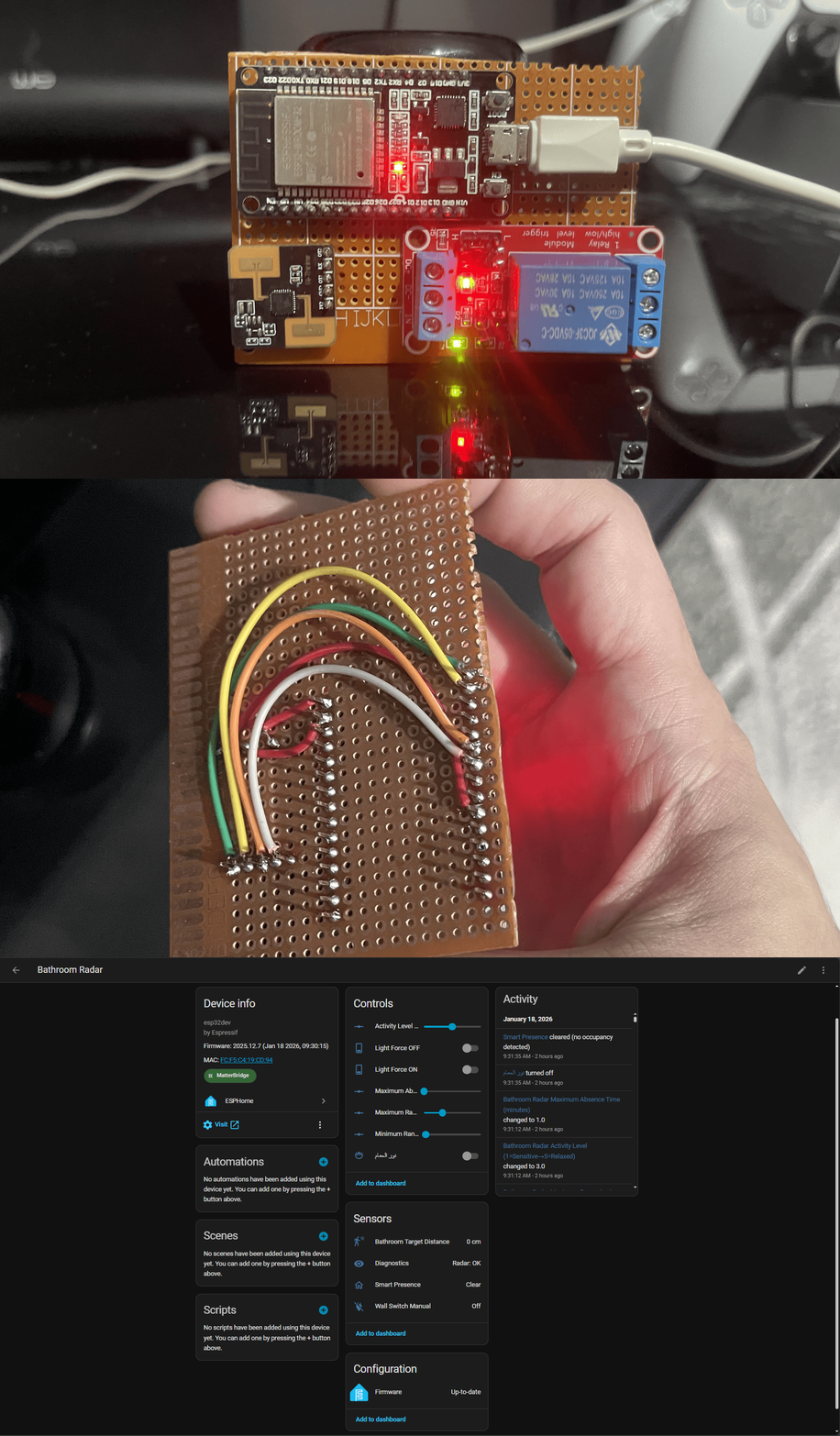
| Component | Specification | Price (approx) |
|---|---|---|
| Radar Sensor | Ai-Thinker RD-03 (24GHz mmWave) | $3-5 |
| Microcontroller | ESP32-DevKit or similar | $4-6 |
| Relay Module | 1-channel 5V relay | $1-2 |
| Power Supply | 5V/2A USB adapter | $2-3 |
| Optional | Wall switch (manual override) | $1-2 |
Total Cost: ~$15-20 (vs $50+ commercial solutions) Total power consumption: ~0.5–1W (very low, suitable for 24/7 operation)
ESP32          RD-03 Radar       Relay          Light
-----          -----------       -----          -----
GPIO17 ────── TX
GPIO16 ────── RX
GPIO19 ──────────────────────── IN  ────────── Load
GPIO18 ────── Wall Switch (optional)
GND    ────── GND ──────────────GND
5V     ────── VCC ──────────────VCC
-
Copy the configuration:
# Download the latest config wget https://raw.githubusercontent.com/gomgom-40/RD-03_presence_radar/main/bathroom_radar_production.yaml -
Update WiFi credentials:
wifi:
  ssid: "YOUR_WIFI_SSID"
  password: "YOUR_WIFI_PASSWORD"
-
Flash to ESP32:
- Open ESPHome Dashboard
- Create new device
- Paste configuration
- Click "Install" → "Plug into this computer"
# Install ESPHome
pip3 install esphome

# Compile and upload
esphome run bathroom_radar_production.yaml- Open Arduino IDE
- Go to Sketch → Include Library → Manage Libraries
- Search for "RD03Radar"
- Click Install
- Done! ✅
Download the latest release from GitHub Releases
lib_deps =
gomgom-40/RD03Radar@^1.0.0#include
RD03Radar radar(RX_PIN, TX_PIN);
void setup() {
Serial.begin(115200);
radar.begin();
}
void loop() {
if (radar.targetDetected()) {
Serial.println("Presence detected!");
float distance = radar.getDistance();
Serial.print("Distance: ");
Serial.print(distance);
Serial.println(" cm");
}
delay(100);
}All settings are exposed to Home Assistant and can be changed without reflashing:
| Parameter | Default | Range | Description |
|---|---|---|---|
| Minimum Range | 20 cm | 10-300 cm | Ignore objects closer than this |
| Maximum Range | 500 cm | 50-600 cm | Ignore objects farther than this |
| Activity Level | 3 | 1-5 | Hold time multiplier (1=sensitive, 5=relaxed) |
| Max Absence Time | 5 min | 1-120 min | Safety timeout for auto-off |
# Requires actual movement to trigger
Threshold: ≥2cm distance change
Hits required: 1 (immediate response)
Result: Light turns ON# Any valid radar reading extends the timer
Valid range: 20-500 cm (configurable)
Activity timer: Resets on each detection
Hold time: Activity_Level × 10 seconds# Fast Exit (15 seconds)
Trigger: No target detected for 15s
Action: Turn OFF immediately
# Safety Timeout (5 minutes default)
Trigger: No activity for Max_Absence_Time
Action: Force OFF (emergency backup)- Radar controls the light automatically
- Motion triggers ON
- No-target triggers OFF (15s delay)
- Physical switch connected to GPIO18
- Overrides all automation
- Light stays ON until switch is turned OFF
- Overrides radar and wall switch
- Light stays ON indefinitely
- Useful for cleaning/maintenance
- Overrides everything
- Light stays OFF
- Useful for energy saving
Check:
- Is radar receiving power? (Red LED on RD-03)
- Are UART connections correct? (TX↔RX crossed)
- Check ESPHome logs:
esphome logs bathroom_radar.yaml - Verify distance readings appear in Home Assistant
Solution:
- This is a rare edge case (2 occurrences in 3 weeks)
- Already handled by
manual_off_recentreset logic - If persistent: Reduce
Maximum Rangefrom 500→250 cm
Fixes:
- Increase
Activity Levelfrom 3→4 or 5 - Check if person is in Min/Max range (adjust if needed)
- Verify radar has clear line-of-sight (no obstructions)
Auto-recovery enabled:
- Watchdog resets radar after 90s silence
- ESP restarts after 12h complete silence
- Check Diagnostics sensor for status
# Binary Sensors
binary_sensor.smart_presence           # Main presence state
binary_sensor.wall_switch_manual       # Physical switch state

# Sensors
sensor.target_distance                 # Real-time distance (cm)

# Text Sensors
sensor.last_presence_timestamp         # When was last detection
sensor.diagnostics                     # System health status

# Switches
switch.bathroom_light_force_on         # Override to ON
switch.bathroom_light_force_off        # Override to OFF
switch.bathroom_light                  # Main relay (نور الحمام)

# Number Inputs
number.minimum_range                   # Min detection range
number.maximum_range                   # Max detection range
number.activity_level                  # Sensitivity (1-5)
number.maximum_absence_time # Safety timeout (min)// Entry Detection (presence_active == false)
1. Extract distance from UART "Range XXX" message
2. Validate: within min_range to max_range
3. Detect motion: distance changed ≥2cm from last reading
4. Trigger: 1 motion hit = presence activated
// Maintenance Mode (presence_active == true)
1. Any valid reading → reset activity timer
2. Invalid/no reading → start no_target_since timer
3. Continue until Fast Exit or Safety timeout
// Exit Detection
Fast Exit: no_target_since > 15 seconds → OFF
Safety: last_activity > max_absence_time → OFF- Manual Override Reset - Prevents false re-trigger after manual turn-off
- Invalid Jump Protection - Ignores jumps from >100cm to <10cm
- Stale Data Clearing - UART buffer auto-clears after 30s inactivity
- Watchdog Recovery - Auto-resets radar on communication failure
Contributions are welcome! Here's how:
- Fork the repository
- Create a feature branch (
git checkout -b feature/amazing-feature) - Commit your changes (
git commit -m 'Add amazing feature') - Push to the branch (
git push origin feature/amazing-feature) - Open a Pull Request
- Keep changes minimal and focused
- Preserve tested logic (3+ weeks bathroom testing)
- Add comments for complex sections
- Test in real hardware before submitting
This project is licensed under the MIT License - see LICENSE file for details.
- ESPHome Team - For the amazing platform
- Ai-Thinker - For the affordable RD-03 radar hardware
- Home Assistant Community - For inspiration and support
- Egyptian Engineering - For turning cheap hardware into smart solutions 🇪🇬
- Issues: GitHub Issues
- Discussions: GitHub Discussions
- Updates: Watch this repo for new features
If this project helped you, please ⭐ star this repository and share it with others!
- Basic presence detection
- Motion-based entry detection
- Multi-mode control system
- Edge case handling
- Multi-zone support (future hardware upgrade)
- Energy consumption tracking
- Mobile app for configuration
- Pre-compiled firmware releases
Made with ❤️ in Egypt 🇪🇬 By the hands of : Mohamed Eid
Transforming budget hardware into premium solutions through software excellence