
The Pet Simulator 99 Clan Monitor Bot is a Discord bot designed to monitor and display detailed information about clan activities in Pet Simulator 99. It fetches clan data from an API and provides real-time updates about the progress of various clan quests. The bot interacts with users through Discord messages and uses embedded messages for a rich display of information.
- Monitor Clan Activities: Continuously monitors the specified clan's quest progress and updates the information at regular intervals.
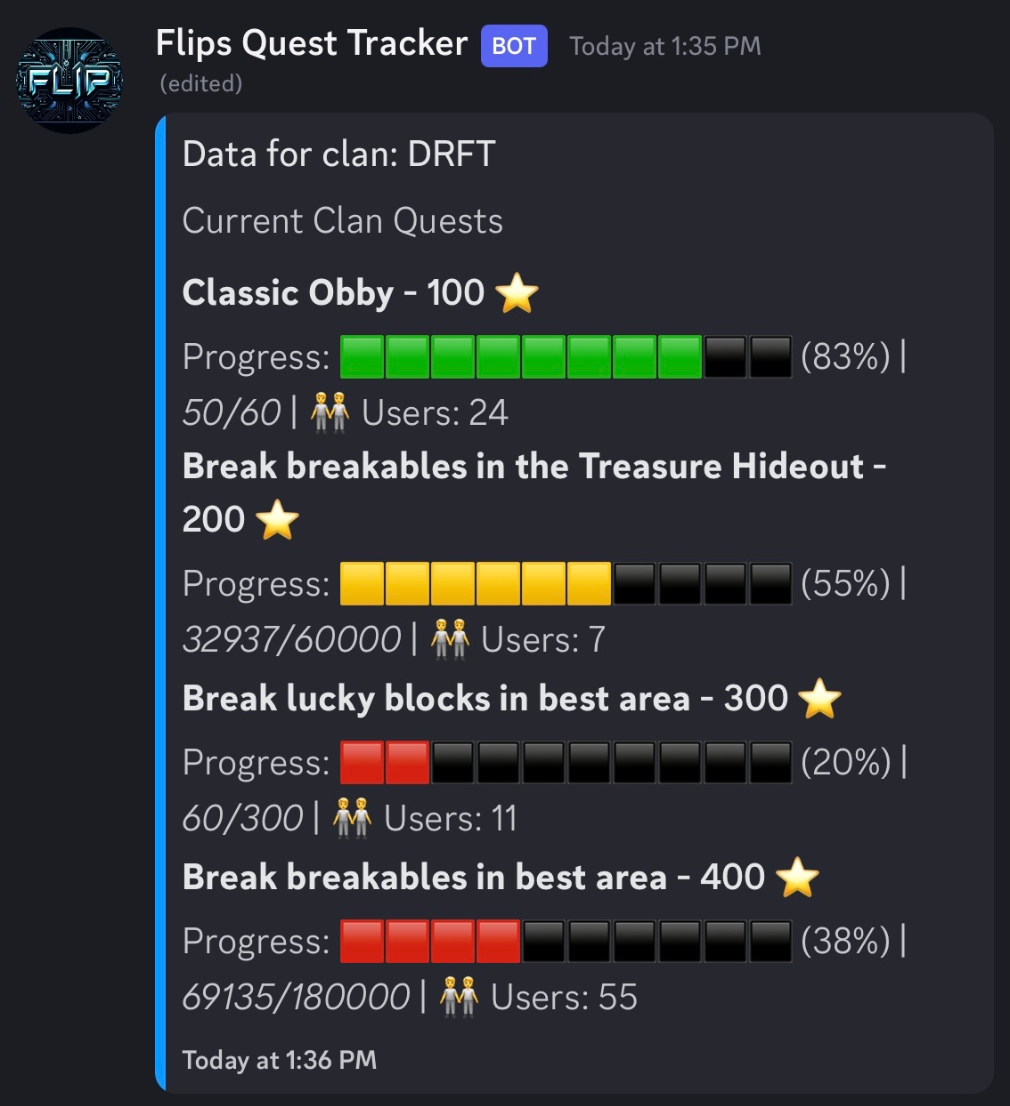
- Dynamic Progress Display: Shows the progress of clan quests with visually appealing progress bars using emojis.
- Retry Mechanism: Implements a retry mechanism to handle API request failures gracefully.
- Multiple Clans Monitoring: Can monitor up to three clans simultaneously, with the ability to stop and start monitoring as needed.
!monitorclan <clanname>: Starts monitoring the specified clan and provides real-time updates on its activities.!stopclan <clanname>: Stops monitoring the specified clan.
-
Clone the Repository
git clone https://github.com/flipcyde/Quest-Tracker.git cd questbot -
Install Dependencies
npm install discord.js axios
-
Create Required Files
token.txt: Your Discord bot token. Place your token in this file.
-
Run the Bot
node your-script-file.js
-
Start the Bot
node your-script-file.js
-
Use the Commands in Discord
- Type
!monitorclan <clanname>in a Discord channel where the bot is present to start monitoring a clan. - Type
!stopclan <clanname>to stop monitoring the specified clan.
- Type
- The bot is initialized with the necessary intents to read messages and interact within guilds (servers).
- The bot listens for messages and identifies commands to either start or stop monitoring clans.
- When
!monitorclan <clanname>is used, it checks if the clan is already being monitored or if the maximum number of monitored clans has been reached. - If monitoring is allowed, it fetches the clan data from the API and sets up an interval to update the data every 20 seconds.
- The bot fetches clan data from the API and parses the information about ongoing clan quests.
- It uses a mapping of quest types to provide meaningful descriptions.
- Progress bars are generated using emojis to visually represent the progress of each quest.
- The bot sends or updates a message in the Discord channel with the current quest data in an embedded format.
- If the bot encounters an error while fetching data, it will retry up to 10 times with a 60-second delay between attempts.
- This ensures that temporary issues do not prevent the bot from functioning correctly.
Contributions are welcome! Please fork the repository and create a pull request with your changes.
This project is licensed under the MIT License.