

A modular closed-loop microscopy software in Python.
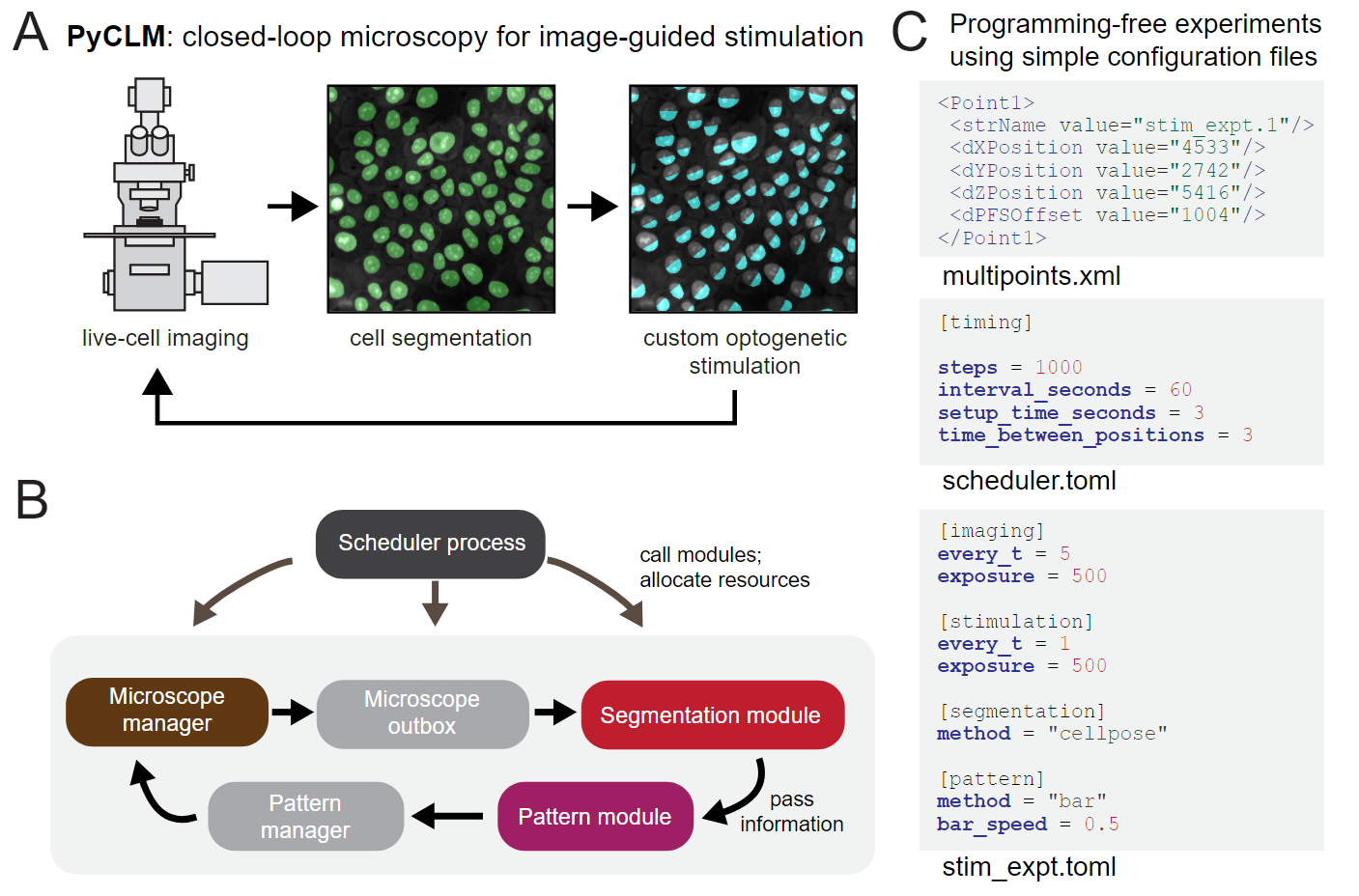
PyCLM runs many optogenetic experiments at once on one microscope. Each imaging position gets its own light pattern, projected through a DMD, that can be fixed, change over time, follow individual cells, or respond to what the cells are doing. Experiments are written as short TOML files, so running a new one needs no programming; a new kind of light rule is a small Python class.
| I want to... | Go to |
|---|---|
| See what light patterns PyCLM can make | Method zoo: every built-in pattern method on a sample image, with a [pattern] table to copy |
| Try it without a microscope | The demo below |
| Set PyCLM up on my microscope | First-time setup |
| Write an experiment | Experiment TOMLs and the pyclm command |
| Write my own light rule | Custom pattern methods |
| Open the data from a run | Data format and export |
The full documentation is at pyclm.readthedocs.io.
pip install "closed-loop-microscopy[gui]"
pyclm new demo --demo
pyclm run demo --dry --gui
The package is closed-loop-microscopy; the import name and the command are
pyclm. Leave out [gui] for a headless install (checking, previews, dry
runs, reading data). For development, clone the repository and run uv sync.
The demo runs two experiments on the virtual microscope (--dry) with
synthetic cells: a sweeping bar of light, and a closed loop that segments the
cells and lights the outward half of each. Pick a method from the
zoo, paste its
[pattern] table over the one in demo/cells.toml (keep channel = "545",
the demo's channel), and run it again.
Running on a real microscope needs Micro-Manager,
which PyCLM drives through
pymmcore-plus; point
config_path in pyclm_config.toml at your Micro-Manager .cfg file. The
installation page
covers the extras and matching the Micro-Manager device interface.
Microscope control, segmentation, tracking, pattern generation and saving run as separate processes in parallel, so the microscope rarely waits and the number of simultaneous experiments is limited mainly by the hardware. Data is written as the run goes (OME-Zarr by default), and ImageJ hyperstacks are exported at the end.
The repository includes three agent skills
that let a coding agent such as Claude Code
walk you through microscope setup
(pyclm-microscope-bringup),
designing an experiment
(pyclm-design-experiment),
and writing a pattern method
(pyclm-write-pattern-method).
Start Claude Code in a clone of this repository and describe what you want;
Using PyCLM skills with Claude Code
has the details.
If you use PyCLM in your research, please cite:
Oatman HR, Lad BC, Nguyen L, Gubbens JH, Toettcher JE. An optogenetic smart microscopy platform reveals signaling dynamics-dependent control over collective cell migration. Cell Systems 17(9) (2026). doi:10.1016/j.cels.2026.101674
The paper describes version 1.0.1. To record the version you used, also cite
that release: every release has its own DOI on Zenodo, all listed under
doi:10.5281/zenodo.20385964
(which always resolves to the latest). GitHub's "Cite this repository" button
gives both, from CITATION.cff.